Software Troubleshooting Techniques for Modern IT Environments
Software Troubleshooting

Software troubleshooting is an important area which aims to ensure that information technology functions effectively. People, and businesses, commonly use software for various purposes including communication, record-keeping and financial matters. Issues such as application faults, sluggishness, network and incompatibility problems can affect a person or business’ ability to work. Good troubleshooting therefore enables people to analyse and address these issues so that systems can then function as intended. Awareness of suitable troubleshooting methods can in addition assist in limiting disruption and enhancing digital systems.
Define the issue
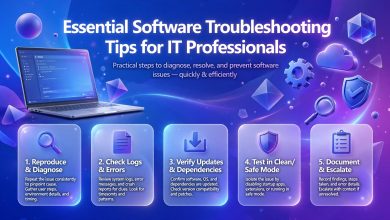
Defining the issue is a fundamental troubleshooting method. People can analyse error notifications, recognise which software has been affected and ascertain when the issue arose. Furthermore, it can be informative to assess if one person or several systems have been impacted. Precisely defining an issue ensures that IT staff do not implement unwarranted fixes and can concentrate on implementing suitable solutions.
Reboot
Rebooting is a basic troubleshooting technique. Transient faults, background programmes and memory concerns can occasionally cause systems to malfunction. Therefore, rebooting an application can at times successfully address an issue. Should this fails to do so, rebooting an entire system can reinvigorate core processes and enable systems to operate as intended, without the need for highly technical intervention.
Update software
Software can become insecure, incompatible and experience faults if it is not up-to-date. Companies continually issue software updates which aim to correct issues, optimise functioning, and add functionality. Staff must ensure that relevant software and operating systems are updated to their most recent, supported version. Installing reputable updates can address particular issues and further enhance digital systems’ effectiveness.
Assess incompatibility
To operate effectively, software needs suitable hardware, alongside a compatible operating system and sufficient system resources. Software can become incompatible where it is installed on unsuitable hardware or an outdated operating system. Prior to software installation, it is advisable to analyse its technical specifications. Assessing a system’s storage, memory and processing power together with operating system versions can then help to avoid issues and unsuccessful software installation.
Analyse system performance
Systems can be analysed to analyse memory, processing power, storage and network functionality. Applications can slow as systems become highly utilised. IT staff can utilise analysis software to analyse a system and recognise deviant behaviour. Routine analysis can allow potential issues to be recognised at an early stage and thus facilitate improved system care.

Analyse networks
Many contemporary software systems rely upon good quality internet and/or business networks. Poor connectivity can stop applications accessing online services, databases and collaborative tools. Analysing networks, rebooting relevant network hardware and analysing network settings can all be suitable troubleshooting actions. Analysing networks enables IT staff to recognise and address issues so that applications can effectively communicate with systems.
Analyse error and analysis logs
Error and analysis logs can give important insights into system and software issues. These can highlight for example, application, process or incompatibility and security related issues. Staff should analyse error and analysis logs to recognise both when and why an issue has occurred. Analysing such logs can therefore increase the accuracy of troubleshooting and furthermore help to avoid reoccurrence of issues.
Analyse security and assess malware threats
Malware, dubious software and inappropriate security settings can sometimes cause software related issues. Good quality security methods, for example, frequent security analyses, up-to-date anti-virus programmes and suitable permissions, can effectively secure a system. Likewise, people should refrain from downloading software from unreliable sources and analyse any anomalous system behaviour. Good quality security procedures not only decrease the likelihood of technical issues but also secure crucial business data.
Record and carry out maintenance
Recording troubleshooting methods enables members of IT staff to effectively address reoccurring issues. Information should be recorded regarding an issue, its likely origin, a solution and outcomes. Alongside this, routinely conducting system maintenance, updating software, backing up data and analysing systems can boost digital system effectiveness. Structured maintenance can also limit disruption and allow businesses to effectively control digital system functionality.
Conclusion
Software troubleshooting is crucial for ensuring that contemporary information technology is effective and functions well. Many typical issues can be addressed by defining issues, analysing software updates, analysing system performance, analysing networks and analysing error and analysis logs. Furthermore, good quality security methods and maintenance routines can also enhance digital system effectiveness. By employing the above nine troubleshooting methods, people and businesses can limit disruption,

securely handle key information and sustain effective digital systems within an ever-more digitalised society.
Thanks