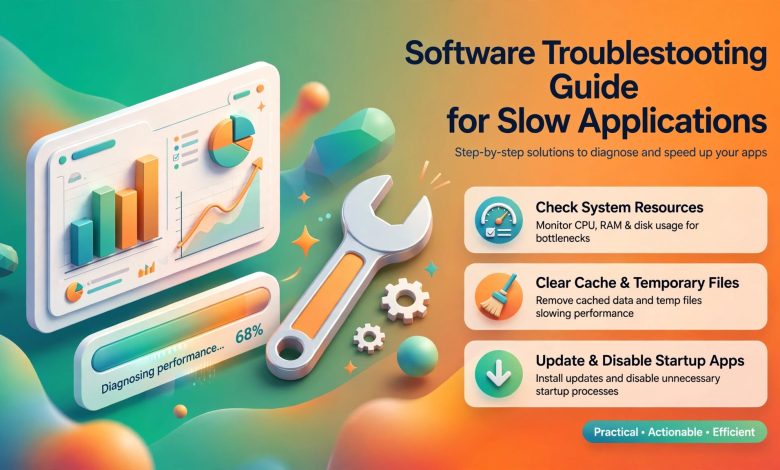
Software Troubleshooting Guide for Slow Applications
Software Troubleshooting

Poor application performance can cause people to become frustrated and can therefore affect a person’s productivity. Poor performance can occur on computers, in mobile devices and on desktops and can impact upon a person’s digital experience. Factors that may lead to poor application performance include: restricted computer resources, software faults and network problems. Awareness of potential causes of poor performance and knowledge of how to address them can aid a person’s ability to tackle and improve their application performance. Below are nine approaches to diagnosing and then addressing poor performance.
Identify why performance is poor
Poor application performance can have several possible causes, such as low computer memory capacity, high central processing unit (CPU) activity and/or software faults. Additionally, poor network performance can contribute to slow application performance. Observing at what times application performance is poor and whether other software is also affected can support a person in analysing the root cause of the issue and so enable suitable action to be taken.
Investigate computer resources
Computers need an adequate level of computer resources to perform well. Computers with insufficient memory, over active CPUs and/or inadequate storage space can all impact upon performance. Within a computer’s task manager, or system monitor, a person can investigate which software is particularly demanding for computer resources. People can then shut down non-essential programmes and increase storage space in order to enhance performance and so allow key software to perform more effectively.
Reboot programme and/or computer
A programme can often be made to perform better by rebooting it. Software can suffer from intermittent faults and/or inefficient and/or highly demanding processes which may all cause performance problems. Rebooting can therefore prove an effective way to address these issues. Furthermore, if problems persist, then rebooting a computer can also help by re-initialising computer processes and eliminating particular intermittent issues.
Continually update software
Older software can sometimes suffer from faults and/or incompatibility and may also perform less well. Typically, developers will produce updated versions of software in order to enhance the reliability, security and functionality of programmes. People should investigate and download appropriate, authorised updates for programmes. Regular updating can thus address software faults and ensure that programmes are able to effectively interact with current computer hardware and operating systems.
Investigate Network Performance
Many modern applications rely upon good quality network access so that they can utilise online facilities, share and manipulate data. Even where software is functioning well, poor or inconsistent network performance can cause an application to appear under-performing. Thus, people should investigate their network performance and, if required, reboot their routers. They should also analyse the performance of other online facilities to assess whether this is impacted by their network.

Remove Application Cache
Applications often utilise cache to hold temporary information and so enhance performance. Nonetheless, corrupted or excessive cache can sometimes lead to application performance issues. Issues may be addressed by erasing application cache via the relevant programme settings. However, people must take care not to delete crucial computer files and should recognise which temporary information can be safely deleted.
Cease un-required programmes
People can unwittingally allow programmes to utilise computer resources such as memory and a computer’s CPU and network access. Automated programme updates, sharing features and other software can all influence computer performance. Assessing computer start-up programmes and shutting down software that is not currently required can liberate key computer resources. Crucially, however, core security and operating system programmes should remain operational.
Assess programme compatibility and re-install
Software can at times exhibit poor performance due to incompatibility with an individual’s computer operating system or hardware. People should analyse the minimum computer requirements for programmes and investigate whether new compatibility information is available. Should performance concerns still arise, re-installing programme from an authorised source may assist in replacing flawed programme files. Before doing so, key information should be backed up.
Analyse software performance and obtain technical support
Where fundamental diagnostic and remedial actions have not successfully addressed performance concerns, people should analyse software performance and note error notifications. Such data can be utilised by technical support personnel to analyse deeper performance issues. Moreover, alongside self-diagnosis, businesses may also find it beneficial to both carry out regular computer maintenance and to engage the services of professional technical staff. Long-term analysis of software performance can thus assist in avoiding re-occurrence of performance concerns and so underpin consistent digital performance.
Conclusion
Whilst poor application performance can hinder productivity, much can often be done to address performance concerns. Approaches such as analysing computer resources, updating programmes and enhancing network performance are all beneficial. Further, assessment of programme compatibility and obtaining technical support can also be of assistance.

Therefore, employing these nine diagnostic and remedial strategies and routinely updating software can enable individuals to achieve enhanced application performance and secure digital performance.
Thanks