Why Updating Drivers Matters: The Overlooked Step for Smooth Operation
Software Updates

We often find really cool things in the world of technology like software or useful upgrades for our devices. Drivers are a part of making sure everything works smoothly behind the scenes. These small pieces of software act as a bridge between the parts of your computers hardware and the operating system. Like other software drivers need to be updated regularly. If you do not update your drivers you might experience hardware failures, security problems and performance issues.
What Is a Driver?
A driver is a piece of software that helps your computers hardware and operating system communicate with each other. It is like a translator that helps languages understand each other. Without the driver your printer will not print your mouse will not move properly. Your graphics card will not display pictures correctly.
Drivers are responsible for everything from audio and video to networking and other devices like cameras and scanners.
What Is a Driver Update?
A driver update is a version of a driver that the manufacturer provides. It is meant to improve performance fix security issues solve problems or add features. For example a new audio driver might improve quality or fix cracking problems while a graphics card driver update might increase frame rates for games or fix system flaws.
The Significance of Driver Updates
Updated drivers can improve your computers performance. They can make your system run faster games play smoothly. Applications respond more quickly.
Driver updates can also fix bugs that might cause your computer to freeze, crash or experience hardware failure.
Updated drivers can improve security by protecting your computer from vulnerabilities that cybercriminals might exploit.
Drivers are also important for making software or operating system upgrades work properly with your hardware. Without updated drivers your hardware might not work well.
Sometimes driver updates can add features. Improve the user experience with new hardware.
How to Update Drivers
There are ways to update your drivers:
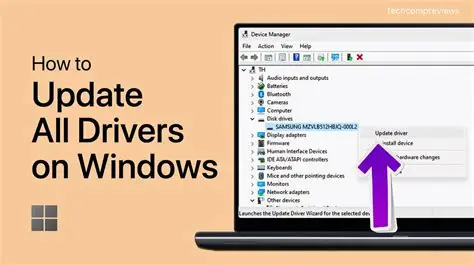
* Using Device Manager: Windows allows you to manually search for driver updates using Device Manager. It checks for versions of drivers through Windows Update.
* Manufacturers Website: You can visit the website of your hardware manufacturer, such as NVIDIA, Intel or AMD to find up-to-date drivers.
* Automatic Driver Updater Tools: Some third-party tools can regularly check your computer. Update all of its drivers. Use software and avoid anything that seems suspicious.
Microsoft sometimes includes driver updates in their Windows updates. Keeping your operating system up, to date can also help with driver compatibility.
Concluding remarks
Although drivers might not be the exciting part of computer systems they are very important. Updating your drivers regularly will keep your computer strong, fast and very useful.
Taking a few minutes to make sure your drivers are updated can save you hours of frustration whether you are a gamer, a professional or just a casual user.