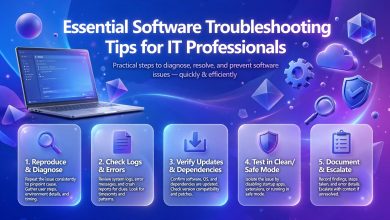
Software troubleshooting is science and art. Software is applied everywhere in today’s world. It makes companies run, educates people, entertains users, enables communication, and manages finances. It has an enormous impact on the daily life of the population. Nevertheless, it is far from perfect, so it needs troubleshooting. Software troubleshooting generally refers to examining the situation and solving it. Here are the main steps of the software troubleshooting in real-life scenarios.
Interpreting
The first step in software troubleshooting implies that the discoverer of an error should tell the interpreter how the error manifested. What were they doing when the error occurred? What led to the error? Did the error appear specific words or symbols? In addition, it is vital to learn whether the error is regular or random. The interpreter must understand the situation and even spend some time providing an in-depth description in order to save hours later. Furthermore, one should not jump to conclusions right away without knowing at least some details.
Recreating
If it is possible, the person who should fix the error (technician) should try to re-create it. They should try doing the same actions in the same environment in which the discoverer did them. For instance, if a specific file freezes when opening in a particular program, the culprit may be either the file or the program. Recreating the error can help to find the cause or at least cross out certain probabilities.
Testing Obvious Things
More often than not, the solutions to software errors are evident. Usually, the program needs to be reinstalled or simply opened again. The system needs the access to the Internet, free space on the hard drive, and a valid account. All of these are the most evident problems that should be double-checked before proceeding to more complicated measures.
Updating
Issues with software often appear because people do not update programs, systems, drivers, or anti-virus software. It is of utmost importance to keep all applications updated in order to maintain stability since the updates usually contain system security improvements. It is vital to note that before updating the operating system or some common software, it is better to test them on a specific machine or a group of machines.
Checking System Resources
In some cases, software errors can occur because the system does not have enough resources to run the application or operate properly. For instance, a program may need more RAM (random-access memory) than the machine can offer. Additionally, a file may exceed the size of the memory card. The utilities can show whether the system resources are lacking for running the program. Moreover, the other opened applications, which may have coincided with the error occurrence in time, can also be closed in order to examine whether they interfered with the software or not. If system resources are indeed the issue, it may be worth considering upgrading some computer parts.

Reading Messages
It is essential to read error messages carefully since those often describe the nature of the problem. The messages that appear should be examined, and one should pay a specific attention to the description of the error. It may even be helpful to literally “Google” the message in order to find similar issues and their solutions. The system log is another excellent source of information. It also includes more specific messages for those who know how to read them. Less experienced people may ask for those who have more expertise since the system log is rather difficult to comprehend for beginners. Nevertheless, the less experienced ones should also study the log closely.
Testing One Change at a Time
When testing changes, it is better to make one small step at a time. Some changes may coincide with the error, so the technician should know for a fact whether they affect the system or not. Thus, one should make one change and observe whether it impacts the error or not. It is a good idea to write down everything that was changed and its results in order to have more data on the issue for the future. This will also help the technician’s superiors or colleagues to quickly see the course of actions in regards to the problem.
Checking Various Compatibility Issues
Many programs need other programs in order to function properly. Accordingly, if one malfunctions, the other one will, as well. It is necessary to consider compatibility issues in terms of other software. It is especially crucial when one examines the list of other software that they use in terms of error troubleshooting. It should be borne in mind that the error may occur after the software was updated.
Making Sure that Everything is Backed Up
When trying to recover the situation, it is essential to remember that no valuable data will be lost. Accordingly, the person in charge should always have a working backup or at least a restore point in case something goes wrong. This way, any database or system can be returned to a stable state if it was updated incorrectly. After all, the competent technicians should understand the value of data, so it is better to keep all files in a secure place rather than risk losing them.
Reviewing Everything
Once everything goes back to normal, it is essential to review everything once again and examine the issue thoroughly. If no valuable data was lost, the technician can literally study the error and its solution. It is also a good time to write down the details of the issue and the ways to solve it. The organization may also compile the knowledge base for employees in order to have a robust guide in case of similar issues in the future.
Conclusion
Software troubleshooting in the real world is a highly intricate and comprehensive process that involves numerous steps. Most of them are rather evident at first glance, although many are not. Nevertheless, even a superficial examination of the situation, including making sure that nothing is lacking,

updating the system, and having a working backup, can save hours for a beginner technician.
Thanks